Begin with the question the photos should answer
Before taking photographs, write a short description of the concern you want to discuss. An image set for a broken driveway entrance is different from one for a large parking-lot maintenance plan. State where the problem is, how it affects the property and what result you are seeking. You do not need to name a technical repair method. Everyday descriptions such as water beside the garage, a recurring hole in a travel lane or a rough entrance are useful starting points. The images should help locate and explain that concern rather than simply show that pavement exists.
Include the exact property address in the message. A recognizable building in a picture is not a substitute for the work-site address. If the property has several entrances, identify the one shown. Explain whether the photographs cover the entire requested work area or only the most visible damage. This prevents an estimate conversation from being built around an incomplete assumption about the size of the project. Keep any future or optional improvements separate from the concern you want reviewed now.
Take overview images before close-ups
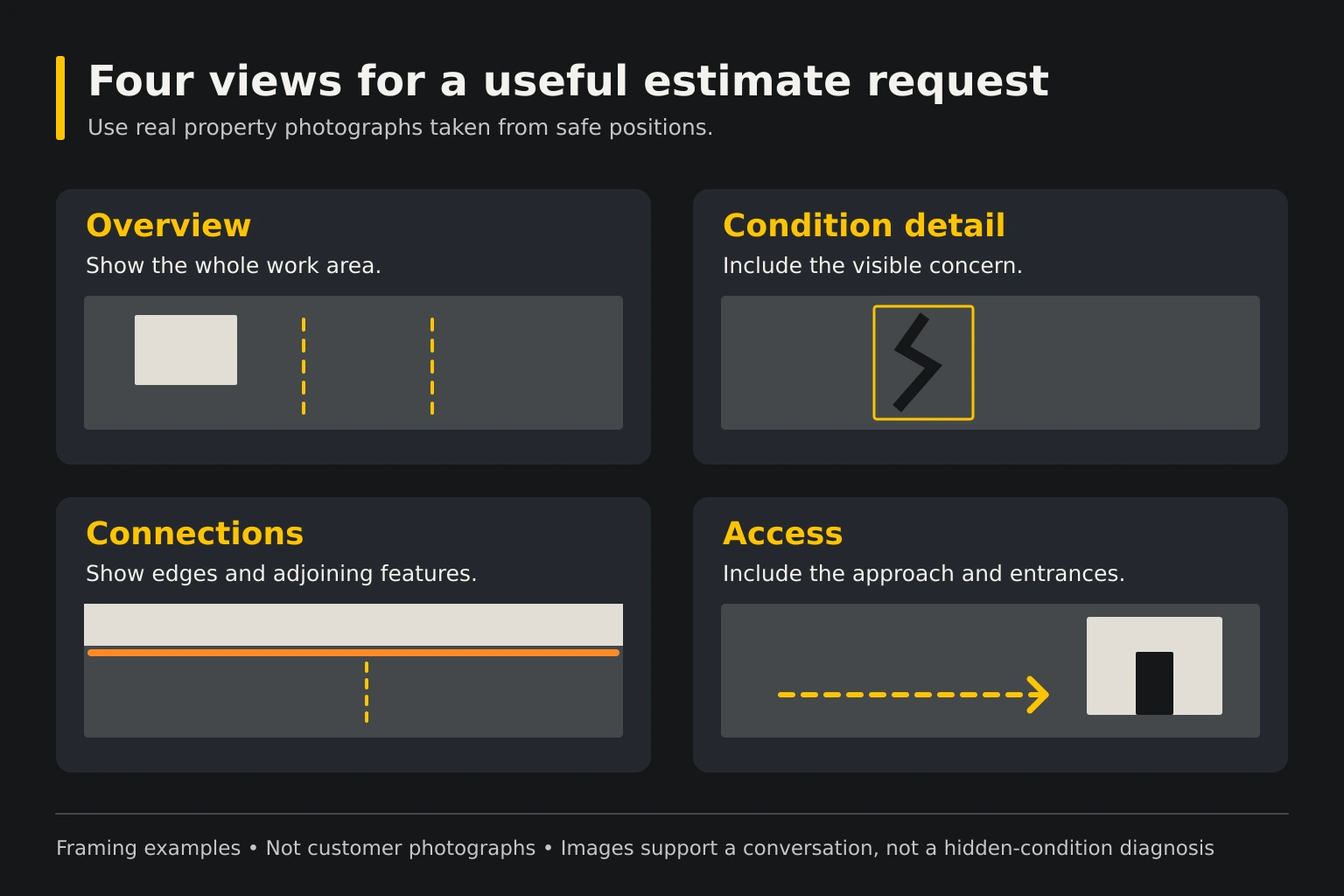
Start far enough back to show the work area and its surroundings from a safe position. Include a driveway's connection to the street or a parking area's relationship to the building. For a long route, take several overlapping views that make its direction understandable. Avoid a series of close-ups with no way to locate them. An overview allows the contractor to connect visible damage with entrances, traffic paths, drainage features and retained pavement.
After the overview, photograph the particular condition. Take one view that shows the detail and another that includes enough surroundings to place it. Use normal camera settings where possible; exaggerated wide-angle perspectives can make distances harder to judge. Label approximate dimensions as approximate. A photograph can support a discussion about work limits, but it does not replace measurements needed for a final scope. If a photograph is cropped, keep the original available so useful context is not lost.
Show the transitions that affect the work
Include the places where the proposed work meets something that will remain. These may be a garage threshold, concrete walkway, street edge, curb, drain inlet or adjoining pavement. Photograph the connection from a direction that makes the relative surfaces visible without stepping into traffic. A repair can look straightforward in a close-up while its transition creates the important planning question. Showing those connections early helps the quote conversation address the whole area you want reviewed.
Explain which features are intended to stay. If you want the driveway resurfaced but the walkway retained, say so. Do not assume the contractor will infer that choice from the photographs. Show gate posts, mailbox supports, landscaped edges and other features close to the work. They may affect equipment access or responsibility for protection. The image set should make the boundaries understandable even to someone who has never visited the property.
Record water observations with context
Photograph visible ponding or runoff from a safe place and note when the image was taken relative to the rain. A picture taken during rainfall and one taken long afterward can represent different observations. Include the surrounding area that might influence the water path, such as a nearby inlet, ditch or downspout. Do not label the cause as confirmed when all you have is an image of the result. Describe what you saw and allow the property conditions to be reviewed.
If the issue recurs, a small dated set can be more useful than many unrelated photographs. Explain whether the water location changes and whether it interferes with access. Never stand in a flooded roadway or approach moving water to obtain a photo. An estimate request does not require unsafe documentation. If a useful view cannot be obtained safely, describe the location and mention that a site visit will be needed to see the connection.
Include access and normal vehicle use
Show how the contractor would reach the work area and identify anything that limits that route. A narrow gate, low branch, parked trailer or occupied service lane may matter even if it is outside the repair boundary. Include an overview of the approach rather than only the pavement inside the property. Tell the contractor which obstacles can be moved and which are fixed. Do not promise equipment access that has not been reviewed.
Describe the vehicles using the pavement and the operations that must continue during work. A residential driveway used by a trailer or a commercial area used by delivery vehicles deserves that context. Photos of wheel marks can help locate the normal travel path, but they do not establish a pavement design. Include operating hours, collection days or other scheduling concerns in text. The image set supports the conversation; it should not be expected to carry every operational fact by itself.
Keep the image set small and organized
Choose clear images with distinct purposes instead of sending every photograph on the phone. A practical set includes an overview, the main conditions, important transitions and the equipment approach. Give the images simple labels that match a sketch or written list. For example, entrance overview and garage connection are more useful than a collection of filenames with no explanation. Retain original files separately so they can be supplied if more detail is needed.
Avoid heavily edited images that remove cracks, change the surface appearance or obscure the condition being reviewed. If you crop or brighten an image for readability, preserve the original and identify the edit when relevant. Do not combine unrelated properties in one request without labeling them clearly. Where multiple sites are involved, create a separate set and address for each. Good organization reduces the risk of a photo being attached to the wrong estimate.
Protect privacy without losing the work context
Keep unnecessary faces, vehicle plates and personal documents out of the photo set where practical. You can choose a different camera angle rather than photographing people to show the work area. If you need to obscure a private detail in a copy, keep the original securely and ensure the pavement condition remains understandable. Do not upload confidential property records simply because a quote form accepts files. Share only the material relevant to the requested discussion.
Tell the company whether photos are being supplied for estimating only or may also be considered for a future public project gallery. Those are different uses. An estimate photo should not automatically become a public case study with an inferred location, date or work description. If public use is later agreed, confirm the information and permissions attached to that specific image set. Accurate captions depend on the actual project record rather than the appearance of the property.
Use the photos to support the next step
Send a concise message with the address, concern, requested work, useful images and access restrictions. Mention any deadline and identify who can arrange a site discussion. If you do not know the dimensions or the preferred repair method, say so. A well-prepared request does not require you to solve the construction problem before contacting the contractor. It allows the company to discuss what information is still needed.
Keep the estimate, later site photographs and approved work limits together after the conversation begins. If the scope changes, update the labeled image or sketch so everyone uses the current version. Do not assume a preliminary photo conversation is a final quote or a guarantee about hidden conditions. Asphalt Solutions can discuss pavement work around Greater New Orleans and the Northshore. The Slidell contact location is by appointment only, so call or text before arranging an in-person visit.
If the property has several people contributing photographs, ask one person to collect and label the final set. Keep a note of the sender and the location represented by each image. This avoids mixing an older photograph, a different property and the current work area into one apparently continuous record.
Questions before you request the estimate
Turn the property facts into a clear next step
Explore the asphalt repair service guide, project planning checklists and photo gallery. Bring the actual property address, useful photographs and access needs to the quote discussion.